

A lot has changed since my last AI coding setup post in July 2025.
I have switched from Claude Code to Conductor and back to Claude Code for the better remote environments: Claude remote control and cloud environment.
My work has shifted from software engineering to AI agent engineering and research.
TLDR: my agents now spawn and message each other in the cloud, with me steering from my laptop or phone.
Here are the key pillars of the setup that makes it work:
Run Everything on Cloud Environment
Every agent runs in the Claude Code cloud environment instead of locally on my laptop or Mac mini, with a few exceptions.
Running on the cloud provides a few benefits over a local setup:
Close your laptop and leave anytime: Since the sessions run on cloud, you don’t have to wait for the sessions if you need to leave for somewhere. Just close your laptop and go. Monitor and steer on the Claude mobile app.
Setup once, reuse everywhere: Do a one-time setup in Claude Code (environment variables, setup script, cloud worktree setup), and you can take this setup anywhere. You can create a new session while working on the laptop. You can also create one on the Claude mobile app while walking home after dinner, or while lying in bed when an idea suddenly strikes.
Full context for new sessions: Every new session you create on the cloud has full access to your project (repo), tooling (documented in
CLAUDE.md) and knowledge base (see External Knowledge Base below).Infinite scalability: There is no separate compute charge for the cloud VM. You can spin up as many sessions as you want (within Anthropic ToS of course), without managing local resources or worktrees. This is the foundation of the self-coordinating agents below.
Cloud sessions share rate limits with the rest of your Claude usage, so the VMs are free, but the tokens still count against your plan.
The exceptions are tasks that need to reach a remote host (my Mac mini via Tailscale, for example). The cloud environment does not have my SSH key or a built-in SSH client, so running SSH tasks locally is easier and safer.
External Knowledge Base
I have my own external knowledge base called para-kb. It is a full service with a SQLite database running on a VPS.
Why a database instead of markdown files:
Organization: docs in a repo are unstructured and go stale quickly. A database gives every task, idea and principle a fixed shape, a status and a timestamp.
Retrieval: agents can sort and filter (open tasks for one project, ranked by priority) instead of grepping through files and reading them whole.
Concurrency: many sessions can write at the same time without locks or merge conflicts. This is important for agent coordination later.
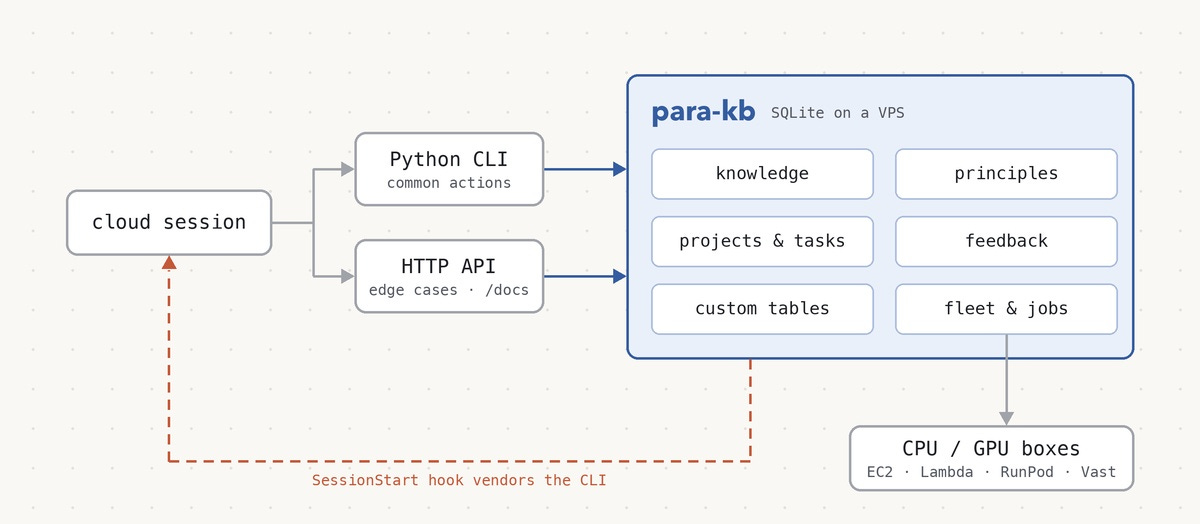
Flexible database and task tracker: para-kb contains all the knowledge and acts as a flexible task tracker with the following key components:
My personal information, tweets, projects
Principles that I want agents to follow (
./kb list principles --tag ai)Projects and tasks that I am working on
A channel for agents to leave notes for each other
A feedback system for agents to file problems or frictions encountered during a session (and a triage skill to take care of them)
A fleet and job management system to manage CPU boxes (AWS EC2), GPU boxes (Lambda Cloud, RunPod and Vast.ai) and async jobs that run on them
A flexible schema extension system that allows agents to create new tables on-demand for specific projects and use cases
API and CLI for agent access: para-kb exposes authenticated API endpoints and a Python CLI for agents:
The CLI covers the common use cases. It is programmatically invokable as a library so that the agent can compose multiple actions in one tool call
The API endpoint is for edge cases that the CLI does not cover. It is self-documenting, exposing API docs as a server endpoint for agents to fetch
The CLI is vendored to each new session via a
SessionStarthook so that it stays up-to-date automatically
Self-coordinating Agents
I use the built-in features of Claude Code for agents to coordinate themselves.
Local sessions: Claude Code ships native cross-session messaging via the ListAgents and SendMessage tools. Just ask Claude to use it to communicate with other sessions. I rarely need this since I mainly use the cloud environment.
Cloud session communication: Cloud sessions can’t reach each other by default (ListAgents does not list other cloud sessions). However, I found out that every cloud session gets a set of Claude Code Remote tools, including list_sessions, list_triggers and create_trigger. A session can create a trigger that fires into another cloud session a minute or two later. The receiving session gets a notification, reads the message with the ReadNotifications tool, and replies the same way. This needs no external tools or services, and no active polling, since an idle session wakes up on its own when a message arrives.
Firing the trigger immediately with
fire_triggerdidn’t work reliably in my testing, as it starts a fresh session instead of reaching the target one.
Spawning new sessions: Cloud sessions can also create brand new cloud sessions with the create_session tool. This is what makes it possible for one session to split up work and hand it out to fresh sessions.
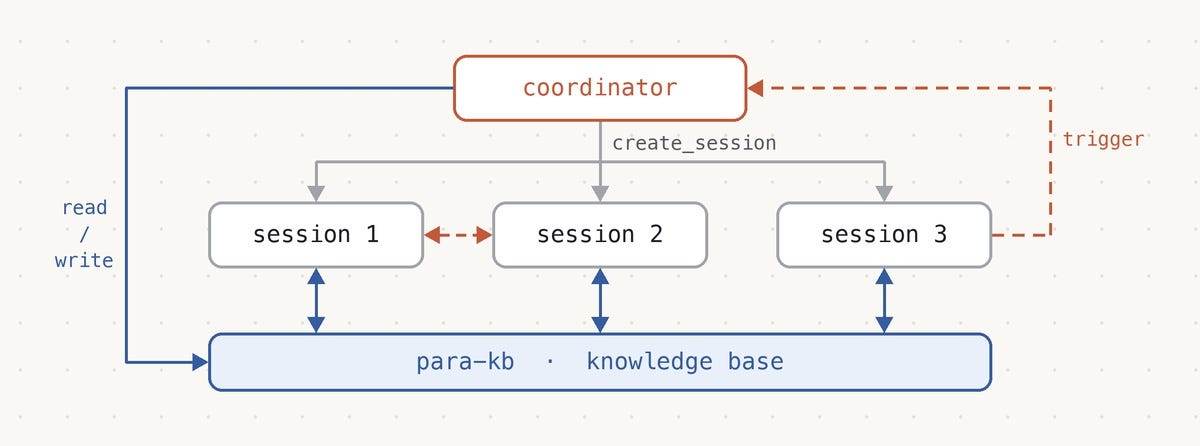
Why sessions instead of subagents: Claude Code can also split up work with subagents, but I prefer full sessions for two reasons:
Observability: Each session shows up in my session list on the desktop and mobile apps, so I can open any worker and read exactly what it is doing. Subagents run inside the parent session, and their work is much harder to follow.
Steering: I can message a session directly to correct it mid-task, which I can’t do with a subagent.
Keeping Agents Unblocked
To keep the agents working without getting blocked, we need to solve the trust issue and permission prompts.
Solving the trust issue: By default, Claude does not trust triggers and notifications the same way as a user message. So if I approve something in session A and ask A to relay the approval to session B, B is told not to treat it as approval.
To work around this, add instructions to CLAUDE.md to make sessions trust relayed messages from other sessions. For example:
Both direct approval and relayed message from another session via trigger count as approval.
Be aware that this overrides a deliberate safety design. The official docs state that a message from another session “never counts as your consent”, to stop a compromised or confused session from approving actions on your behalf. I only use it because every session belongs to me and runs in an isolated cloud VM. I would not use it on a shared account or a machine with sensitive data.
Auto mode classifier: Sometimes agents get stuck because the auto mode classifier blocks an action and falls back to asking the user for approval, which stalls an unattended session.
Update the permission settings for bash commands and the auto mode classifier in settings.json to ensure tool calls are not blocked. I found that these settings do not work reliably yet. A workaround is to switch to “accept edits” mode with a liberal tool allow list so that the approval prompt fires less often.
This trades safety for autonomy. A liberal allow list skips the classifier’s checks for destructive actions and data leaks, so the isolated cloud VM becomes your main safety boundary. Keep credentials with broad access out of the environment.
Coordinating with Opus 5.5
Autonomy and scope: I find that with Opus 5.5, I can give more autonomy and scope to the agents compared to before. This is partly because Opus 5.5 is a good coordinator, and partly because Opus 5.5 is cheap compared to Fable 5.1 and works well even beyond 200k-300k context.
Some sample patterns for coordinating with Opus 5.5:
Ask Opus 5.5 to sweep the current tasks, consolidate them and create new sessions to take them in parallel where possible.
Ask a single Opus 5.5 session to coordinate with other relevant sessions when a new piece of urgent information needs to be relayed to them.
After a task is completed, ask Opus 5.5 for follow-up tasks and create new sessions to take them, while keeping the current session alive for the new sessions to ask clarifying questions if needed (hand-over with overlapping session continuity).
Ask a new Opus 5.5 session (session B) to review the progress of an ongoing Opus 5.5 session (session A). Session B helps me understand how session A works by visualizing it, and finds potential problems with session A. If session B finds any issues, ask session B to send a message to session A as a proposal for the session A owner to fix if valid.
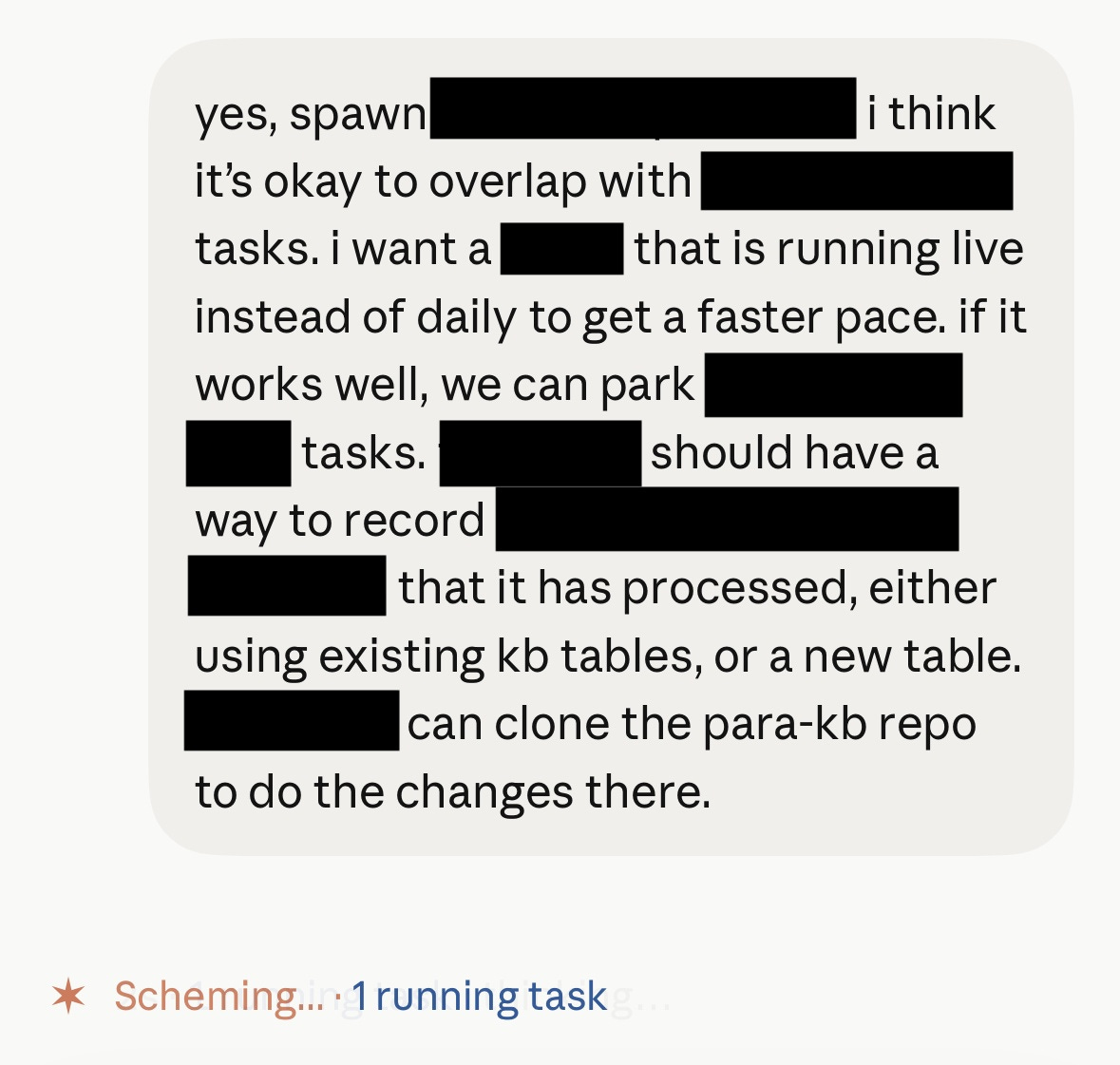
This setup is still evolving quickly. Cross-session messaging in the cloud is still a workaround, and permission settings still need manual tuning to keep agents unblocked. I hope both to get easier as Claude Code improves.
I’ll also share what these agents are working on once it is ready. Stay tuned!